


Messages can include information such as the alert name, rule type, severity, timestamp, client and server IP addresses, together with a direct link to the corresponding alert in Sycope.
This allows Slack to become an additional notification and collaboration layer while Sycope remains the source of the underlying network data and the environment for further investigation.
Table of Contents
From a Sycope alert to the team channel
An alert generated in Sycope can trigger an External Action that sends a structured message to Slack through an Incoming Webhook.
The action can be executed automatically by assigning it to a specific rule or manually from a context menu. This gives teams control over which events should be forwarded and helps avoid sending every Sycope alert into a collaboration channel.
The message itself can be adapted to the needs of the receiving team. Slack Block Kit supports structured sections, fields, context and buttons, while Sycope placeholders allow values from the alert to be inserted dynamically into the message.
A security team may therefore receive the alert name, severity, source and destination information, while another workflow can use a different set of fields relevant to network operations.
A direct View in Sycope action can take the user from the Slack message to the corresponding alert in Sycope with the Alert ID already applied as a filter. The same mechanism can also be configured to open another Sycope dashboard or view.
Complementary capabilities, clearly divided
Sycope and Slack continue to serve different roles within the workflow.
Sycope provides:
- Network visibility and traffic analysis
- Network performance monitoring
- Network anomaly and threat detection
- Alert generation based on configured rules
- Detailed data for further investigation
- Dashboards and analytical context
Slack provides:
- Real-time team communication
- Shared channels for operational and security teams
- Message threads for discussing individual alerts
- A familiar environment for coordinating ownership and follow-up
- Structured webhook messages and interactive links
Sycope detects and analyzes network activity, while Slack makes selected information visible to the people responsible for responding to it.
Bringing alerts closer to the response workflow
Sending selected alerts to Slack reduces the distance between detection and the team responsible for taking action.
Immediate visibility for relevant teams
Critical or operationally important Sycope alerts can be delivered directly to dedicated channels such as security, NOC or network operations channels.
Teams do not need to continuously watch the Sycope alert view to become aware of selected events. The webhook provides an additional notification path that brings the event into an environment already used for day-to-day communication.
Context available with the notification
A Slack message can contain more than the alert name alone.
Dynamic fields from Sycope can provide the information needed for an initial assessment, including severity, time of detection and the client and server addresses involved.
This gives the recipient enough context to determine whether the alert requires immediate investigation before opening the full event in Sycope.
Collaboration around an alert
Once an alert appears in Slack, the team can use the standard collaboration features of the platform to coordinate the response.
A message thread can keep discussion related to a specific alert in one place, while team members can indicate who is taking ownership, exchange observations and coordinate subsequent actions.
Slack supports the collaboration around the event, while the actual alert and its network context remain available in Sycope.
Direct transition to deeper investigation
The example integration includes a View in Sycope button that links directly to the relevant alert.
This allows an engineer who needs additional information to move from the notification to the detailed Sycope view without manually searching for the event or reproducing its parameters.
The notification therefore acts as an entry point into the investigation rather than attempting to reproduce the full analytical context inside Slack.
A ready and configurable webhook integration
The Sycope public integration repository includes an example Slack payload that can be used as a starting point for the integration.
The provided message contains the alert type and name together with the timestamp, threshold level, client IP and server IP. It also includes a button linking back to the alert in Sycope.
The payload can be modified according to the requirements of a specific team. Sycope provides built-in placeholders as well as access to values contained in the alert result object, allowing organizations to decide which information should appear in Slack.
This makes it possible to create different notification formats for different rules, alert types or operational teams without changing the underlying Sycope detection logic.
How the integration works
The integration consists of four main elements.
Slack Incoming Webhook
A Slack application is configured with an Incoming Webhook connected to the channel where Sycope notifications should be delivered.
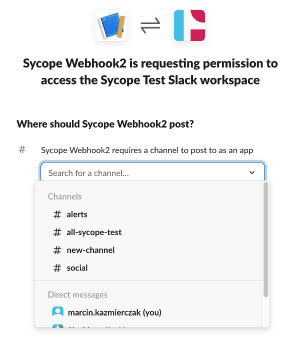
The webhook provides the endpoint used by Sycope to send the message.
External Destination in Sycope
The Slack webhook is configured in Sycope as an External Destination using the REST Client type.

The destination defines the Slack webhook URL and the payload that should be sent when the action is executed.
Dynamic alert payload
The payload uses Sycope placeholders to populate the Slack message with information from the active alert.
The example available in the integration repository includes the rule type, alert name, timestamp, client IP, server IP and threshold level. Values from the alert result object can also be referenced when additional information is required.


Manual or automatic triggering
The External Action can be executed manually from a context menu or assigned to a Sycope rule so that notifications are sent automatically when matching alerts are generated.
This allows teams to define which alerts should reach Slack and which should remain available only within the Sycope monitoring environment.


From notification to investigation
Consider a security rule in Sycope that detects activity requiring attention.
When the rule generates an alert, the associated External Action sends a webhook message to the appropriate Slack channel. The team immediately receives the alert name, severity, timestamp and information about the systems involved.
The notification provides enough context for an initial assessment and gives team members a place to coordinate the response.
If deeper analysis is required, the engineer opens the alert directly in Sycope using the link included in the message. The investigation then continues with the network data, dashboards and analytical information available in Sycope.
Slack therefore becomes part of the notification and collaboration workflow without replacing the system responsible for detecting and investigating the network event.
See the integration in your environment
The Sycope–Slack integration brings selected network and security alerts into the communication channels where operational teams already work.
Webhook-based notifications provide immediate context, configurable message content and a direct path back to Sycope for further investigation.
Want to connect Sycope alerts with your team’s Slack workflow? Talk to our team.




